
Device disconnection
Because transaction processing runs on the Axium device — not on the host mobile device — a Bluetooth or TCP/IP disconnection during a transaction does not automatically terminate the transaction the way it would on a traditional PIN pad integration. The transaction continues on the Axium; the SDK simply loses visibility of it.
This page explains the SDK's behaviour during a disconnection and how your integration should respond.
What Happens on Disconnect
When the SDK loses its connection to the Axium during a transaction:
- The SDK emits a
TransactionUpdateevent with the valueAttemptingToReconnect(see Configuration and utility events). - The SDK enters a reconnection loop, attempting to re-establish the connection to the Axium until one of two things happens:
- The connection is restored — the SDK fetches the transaction state from the Axium and emits the normal
transactionFinishedevent. - Your application calls
terminateTransaction()— see below.
- The connection is restored — the SDK fetches the transaction state from the Axium and emits the normal
The transaction itself continues on the Axium device throughout. From the device's perspective, the host disconnecting is irrelevant — the cardholder may still complete the payment.
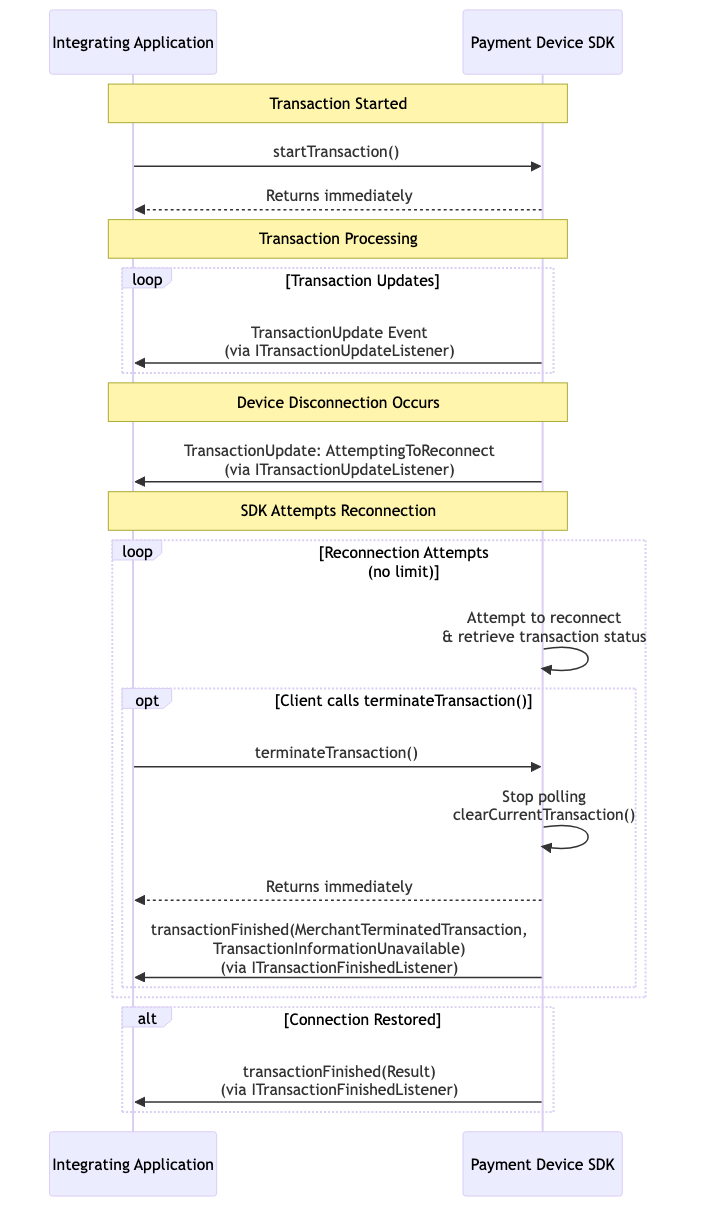
Terminating During a Disconnection
If your application chooses not to wait for reconnection and calls terminateTransaction() while the SDK is in the reconnection loop, the SDK emits a transactionFinished event with the following values:
| Parameter | Value |
|---|---|
TransactionResult | Unknown |
TransactionState | Unknown |
Errors | MerchantTerminatedTransaction, TransactionInformationUnavailable |
TransactionResult = Unknowndoes NOT mean the transaction failed. It means the SDK could not determine the outcome because the device was unreachable when termination was requested. The transaction may still have completed successfully on the Axium.
Recovering After a Manual Termination
When you've terminated during a disconnection, the only way to discover the true outcome is to query the Axium directly once the connection is restored.
- Wait for the Axium to become reachable again — for example, by re-running
connectAndConfigure()or by observing a successfulgetStatus(). - Call
getTransactionInformation()passing the terminated transaction'sUserReference. - Inspect the returned
TransactionResultandTransactionStateto determine whether the transaction was approved, declined, or never completed.
val params = Parameters()
params.add(ParameterKeys.UserReference, terminatedUserReference)

val info = ChipDnaMobile.getInstance().getTransactionInformation(params)
val result = info.getValue(ParameterKeys.TransactionResult)
val state = info.getValue(ParameterKeys.TransactionState)
Based on the returned values, your integration should:
- Reconcile the transaction in your back office if it completed successfully on the Axium.
- Void or refund the transaction if it was approved but you no longer want to take payment.
- Take no further action if the transaction never completed on the device.
See the shared Configuration and Utility Methods page for the full getTransactionInformation() reference.
Updated about 1 month ago