
Payment Component
Secure payment processing using our tokenization system
Building with AI coding assistant like Claude Code, Cursor, VS Code, or Windsurf? Connect the NMI Developer Docs MCP before you start, so your assistant scaffolds this integration from current NMI docs — the Payment Component + NMI REST API — instead of guessing endpoints.
Setup details: Developer Docs MCP for AI Coding Assistants.
Docs-only — no account or auth. (A config-editing agent can even set up the MCP itself once it reads that page.)
Overview
Recommended integration. The Payment Component is NMI's recommended way to capture payments—cards, ACH, Apple Pay, and Google Pay—and process them with the NMI REST API. Prefer it over Collect.js for new integrations.
Part of the Embedded Components suite. The Payment Component (this page—the
USER.PAYNPMPACKAGE/USER.PAYREACTNPMPACKAGEnpm packages / Gateway.js) enables secure payment capture, while other Embedded Components provide reporting experiences such as transaction and deposit history.
The Payment Component is the fastest, most secure way to add payments to your digital experiences. Designed to fit seamlessly into your checkout flow, it lets you accept cards and digital wallets without ever touching sensitive data—keeping you PCI DSS compliant and your customers’ trust intact.
Whether you’re building a new checkout or upgrading your existing flow, our Payment Component delivers the flexibility, security, and branding control you need to deliver a frictionless payment experience.
- Built for Security – Cardholder data never passes through your servers.
- Fast to Implement – Drop it into your site or app with minimal code.
- Brand-Ready – Customize colors, fonts, and layouts with the Appearance API.
- Fraud Protection Built In – Integrated support for 3D Secure (3DS) authentication.
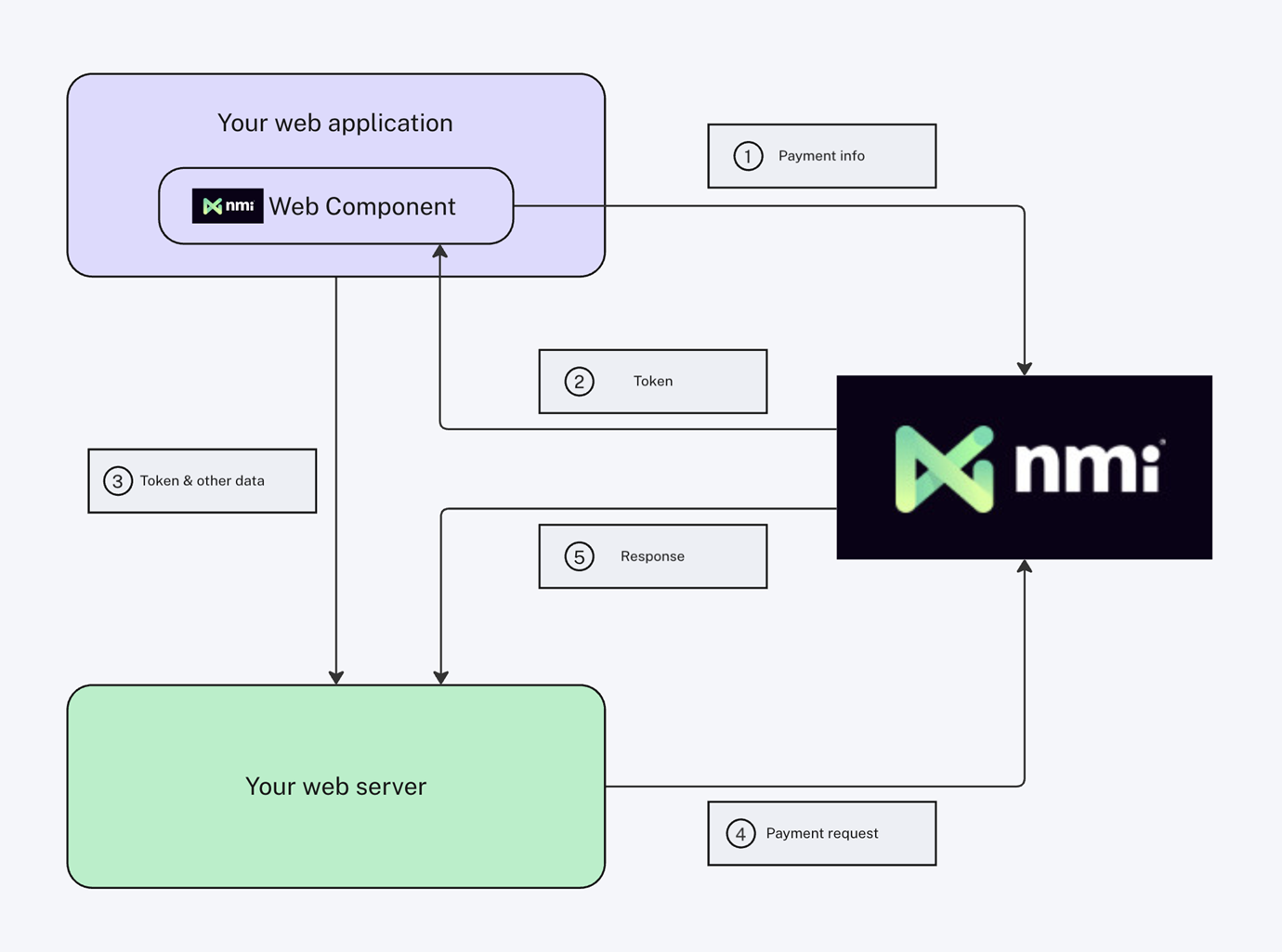
How It Works
- Embed the Component – Place the Payment Component in your checkout page.
- Customer Enters Payment Details – Via card entry or supported digital wallets.
- Secure Tokenization – The component instantly converts payment details into a secure token.
- Server-to-Server Processing – Your backend sends the token to the NMI REST API.
- Get Real-Time Results – NMI processes the payment and returns the transaction outcome.
Common Use Cases
The Payment Component captures a payment method once, then works with the NMI REST API for whatever comes next:
- Save a card / card on file — tokenize a card and store it in the Customer Vault to charge later. See Sale and add to customer vault.
- Charge later / bill a saved customer — reference a stored customer vault ID to run a payment without re-collecting card details.
- Recurring billing & subscriptions — pair tokenized payment methods with Recurring Transactions.
- One-time sale — tokenize and process a single sale.
Migrating from Collect.js or the Classic API? Follow the Classic API migration playbook and the payment code examples.
Quick Start Guide
Welcome to the Payment Component integration guide. Follow the steps below to embed secure, tokenized payment processing into your application.
Step 1: Install the Frontend Package
Install the Payment Component npm package for your framework.
npm i USER.PAYREACTNPMPACKAGEnpm i USER.PAYNPMPACKAGESupported Payment Methods: Credit and debit cards, ACH bank accounts, Apple Pay, and Google Pay.
Step 2: Embed the Payment Component
Import and mount the USER.CAMELCOMPONENTPREFIXPayments component in your checkout page. Provide your public tokenization key and an onPay handler to receive the payment token once the customer submits their details.
The component handles secure field rendering, input validation, and tokenization. Sensitive card data never passes through your servers.
Tokenization Key Warning:The public merchant tokenization key has been replaced with
YOUR_PUBLIC_KEY_HERE, please replace it with your actual merchant key.
Note: Either
onPayoronChangemust be implemented to obtain the payment token. UseonChangeif you plan to integrate 3D Secure (3DS).See also: Integrating the Frontend Component
Step 3: Configure Your Tokenization Key
Your tokenization key is a public key that identifies your merchant account. It is safe to include in frontend code. For sandbox testing, locate it in the key management screen under Merchant Keys.
When you are ready to go live, replace this key with the corresponding key from your production merchant account.
Tip: The component will display a loading spinner while payment fields initialize. Use the
onFieldsAvailablecallback to customize this loading experience.
Step 4: Implement the Backend Endpoint
On your server, create an endpoint that accepts the payment token from your frontend and forwards it to the NMI REST API for processing. Your private API security key is used here and must never be exposed in client-side code.
// Server-side code (Node.js/Express)
const express = require('express');
const axios = require('axios');
const router = express.Router();

router.post('/process-payment', async (req, res) => {
  try {
    const { paymentToken, amount } = req.body;

    // Call USER.BRAND's v5 Payments API
    const response = await axios.post('https://sandbox.nmi.com/api/v5/payments/sale', {
      amount: parseFloat(amount),
      payment_details: {
        payment_token: paymentToken
      }
    }, {
      headers: {
        'Content-Type': 'application/json',
        'Authorization': 'USER.PRIVATEAPIKEY'
      }
    });

    // Check for successful response (response code 1)
    if (response.data.response === '1') {
      return res.json({
        success: true,
        transactionId: response.data.id
      });
    } else {
      return res.json({
        success: false,
        error: response.data.response_text
      });
    }
  } catch (error) {
    console.error('Payment processing error:', error);
    return res.status(500).json({
      success: false,
      error: 'An error occurred while processing the payment'
    });
  }
});

module.exports = router;
# Server-side code (Python/Flask)
from flask import Flask, request, jsonify
import requests
import logging
app = Flask(__name__)
@app.route('/process-payment', methods=['POST'])
def process_payment():
try:
data = request.get_json()
payment_token = data.get('paymentToken')
amount = data.get('amount')
# Call USER.BRAND's v5 Payments API
headers = {
'Content-Type': 'application/json',
'Authorization': 'USER.PRIVATEAPIKEY'
}
payload = {
'amount': float(amount),
'payment_details': {
'payment_token': payment_token
}
}
response = requests.post(
'https://sandbox.nmi.com/api/v5/payments/sale',
json=payload,
headers=headers
)
response_data = response.json()
# Check for successful response (response code 1)
if response_data.get('response') == '1':
return jsonify({
'success': True,
'transactionId': response_data.get('id')
})
else:
return jsonify({
'success': False,
'error': response_data.get('response_text', 'Unknown error')
})
except Exception as error:
logging.error(f'Payment processing error: {error}')
return jsonify({
'success': False,
'error': 'An error occurred while processing the payment'
}), 500
if __name__ == '__main__':
app.run(debug=True)// Server-side code (Java/Spring Boot)
package com.example.payments;
import org.springframework.http.*;
import org.springframework.web.bind.annotation.*;
import org.springframework.web.client.RestTemplate;
import com.fasterxml.jackson.databind.ObjectMapper;
import java.util.Map;
import java.util.HashMap;
@RestController
@RequestMapping("/api")
public class PaymentController {
private final ObjectMapper objectMapper = new ObjectMapper();
@PostMapping("/process-payment")
public ResponseEntity<Map<String, Object>> processPayment(@RequestBody PaymentRequest request) {
try {
// Prepare the request to the USER.GATEWAYNAME REST API
RestTemplate restTemplate = new RestTemplate();
Map<String, Object> paymentDetails = new HashMap<>();
paymentDetails.put("payment_token", request.getPaymentToken());
Map<String, Object> payload = new HashMap<>();
payload.put("amount", request.getAmount());
payload.put("payment_details", paymentDetails);
HttpHeaders headers = new HttpHeaders();
headers.setContentType(MediaType.APPLICATION_JSON);
headers.set("Authorization", "USER.PRIVATEAPIKEY");
HttpEntity<Map<String, Object>> entity = new HttpEntity<>(payload, headers);
// Call USER.BRAND's v5 Payments API
ResponseEntity<Map> response = restTemplate.exchange(
"https://sandbox.nmi.com/api/v5/payments/sale",
HttpMethod.POST,
entity,
Map.class
);
Map<String, Object> responseData = response.getBody();
Map<String, Object> result = new HashMap<>();
// Check for successful response (response code 1)
if ("1".equals(responseData.get("response"))) {
result.put("success", true);
result.put("transactionId", responseData.get("id"));
} else {
result.put("success", false);
result.put("error", responseData.getOrDefault("response_text", "Unknown error"));
}
return ResponseEntity.ok(result);
} catch (Exception error) {
System.err.println("Payment processing error: " + error.getMessage());
Map<String, Object> errorResult = new HashMap<>();
errorResult.put("success", false);
errorResult.put("error", "An error occurred while processing the payment");
return ResponseEntity.status(HttpStatus.INTERNAL_SERVER_ERROR).body(errorResult);
}
}
public static class PaymentRequest {
private String paymentToken;
private Double amount;
// Getters and setters
public String getPaymentToken() { return paymentToken; }
public void setPaymentToken(String paymentToken) { this.paymentToken = paymentToken; }
public Double getAmount() { return amount; }
public void setAmount(Double amount) { this.amount = amount; }
}
}// Server-side code (C#/.NET Core)
using Microsoft.AspNetCore.Mvc;
using System.Text;
using System.Text.Json;
[ApiController]
[Route("api/[controller]")]
public class PaymentController : ControllerBase
{
private readonly HttpClient _httpClient;
private readonly ILogger<PaymentController> _logger;
public PaymentController(HttpClient httpClient, ILogger<PaymentController> logger)
{
_httpClient = httpClient;
_logger = logger;
}
[HttpPost("process-payment")]
public async Task<IActionResult> ProcessPayment([FromBody] PaymentRequest request)
{
try
{
// Prepare the request to the USER.GATEWAYNAME REST API
var payload = new
{
amount = request.Amount,
payment_details = new
{
payment_token = request.PaymentToken
}
};
var jsonContent = new StringContent(
JsonSerializer.Serialize(payload),
Encoding.UTF8,
"application/json"
);
_httpClient.DefaultRequestHeaders.Clear();
_httpClient.DefaultRequestHeaders.Add("Authorization", "USER.PRIVATEAPIKEY");
// Call USER.BRAND's v5 Payments API
var response = await _httpClient.PostAsync(
"https://sandbox.nmi.com/api/v5/payments/sale",
jsonContent
);
var responseString = await response.Content.ReadAsStringAsync();
var responseData = JsonSerializer.Deserialize<Dictionary<string, object>>(responseString);
// Check for successful response (response code 1)
if (responseData.TryGetValue("response", out var responseCode) && responseCode?.ToString() == "1")
{
return Ok(new
{
success = true,
transactionId = responseData.GetValueOrDefault("id")?.ToString()
});
}
else
{
return Ok(new
{
success = false,
error = responseData.GetValueOrDefault("response_text")?.ToString() ?? "Unknown error"
});
}
}
catch (Exception error)
{
_logger.LogError(error, "Payment processing error");
return StatusCode(500, new
{
success = false,
error = "An error occurred while processing the payment"
});
}
}
public class PaymentRequest
{
public string PaymentToken { get; set; } = string.Empty;
public decimal Amount { get; set; }
}
}<?php
// Server-side code (PHP)
header('Content-Type: application/json');
if ($_SERVER['REQUEST_METHOD'] !== 'POST') {
http_response_code(405);
echo json_encode(['success' => false, 'error' => 'Method not allowed']);
exit;
}
try {
// Get JSON input
$input = json_decode(file_get_contents('php://input'), true);
if (!$input || !isset($input['paymentToken']) || !isset($input['amount'])) {
http_response_code(400);
echo json_encode(['success' => false, 'error' => 'Missing required fields']);
exit;
}
$paymentToken = $input['paymentToken'];
$amount = $input['amount'];
// Prepare the request to the USER.GATEWAYNAME REST API
$payload = [
'amount' => (float) $amount,
'payment_details' => [
'payment_token' => $paymentToken
]
];
// Call USER.BRAND's v5 Payments API
$ch = curl_init();
curl_setopt($ch, CURLOPT_URL, 'https://sandbox.nmi.com/api/v5/payments/sale');
curl_setopt($ch, CURLOPT_POST, true);
curl_setopt($ch, CURLOPT_POSTFIELDS, json_encode($payload));
curl_setopt($ch, CURLOPT_RETURNTRANSFER, true);
curl_setopt($ch, CURLOPT_SSL_VERIFYPEER, true);
curl_setopt($ch, CURLOPT_HTTPHEADER, [
'Content-Type: application/json',
'Authorization: USER.PRIVATEAPIKEY'
]);
$response = curl_exec($ch);
$httpCode = curl_getinfo($ch, CURLINFO_HTTP_CODE);
curl_close($ch);
if ($response === false) {
throw new Exception('cURL error occurred');
}
// Parse JSON response
$responseData = json_decode($response, true);
// Check for successful response (response code 1)
if (isset($responseData['response']) && $responseData['response'] === '1') {
echo json_encode([
'success' => true,
'transactionId' => $responseData['id'] ?? null
]);
} else {
echo json_encode([
'success' => false,
'error' => $responseData['response_text'] ?? 'Unknown error'
]);
}
} catch (Exception $error) {
error_log('Payment processing error: ' . $error->getMessage());
http_response_code(500);
echo json_encode([
'success' => false,
'error' => 'An error occurred while processing the payment'
]);
}
?><?php
// Server-side code (PHP/Laravel)
namespace App\Http\Controllers;
use Illuminate\Http\Request;
use Illuminate\Http\JsonResponse;
use Illuminate\Support\Facades\Http;
use Illuminate\Support\Facades\Log;
class PaymentController extends Controller
{
public function processPayment(Request $request): JsonResponse
{
try {
// Validate the request
$validated = $request->validate([
'paymentToken' => 'required|string',
'amount' => 'required|numeric|min:0.01'
]);
// Prepare the request to the USER.GATEWAYNAME REST API
$response = Http::withHeaders([
'Content-Type' => 'application/json',
'Authorization' => 'USER.PRIVATEAPIKEY'
])->post('https://sandbox.nmi.com/api/v5/payments/sale', [
'amount' => (float) $validated['amount'],
'payment_details' => [
'payment_token' => $validated['paymentToken']
]
]);
$responseData = $response->json();
// Check for successful response (response code 1)
if (isset($responseData['response']) && $responseData['response'] === '1') {
return response()->json([
'success' => true,
'transactionId' => $responseData['id'] ?? null
]);
} else {
return response()->json([
'success' => false,
'error' => $responseData['response_text'] ?? 'Unknown error'
]);
}
} catch (\Illuminate\Validation\ValidationException $e) {
return response()->json([
'success' => false,
'error' => 'Validation failed',
'details' => $e->errors()
], 400);
} catch (\Exception $e) {
Log::error('Payment processing error: ' . $e->getMessage());
return response()->json([
'success' => false,
'error' => 'An error occurred while processing the payment'
], 500);
}
}
}Security: Store your private API key as an environment variable. Never commit it to source control or expose it in client-side code.
See also: Implement Backend
Step 5: Test in the Sandbox Environment
Before going live, validate your integration using NMI's sandbox environment with the test credentials below. No real money movement occurs during sandbox testing.
Test Credit Cards:
| Card Type | Number |
|---|---|
| Visa | 4111111111111111 |
| MasterCard | 5431111111111111 |
| Discover | 6011000991300009 |
| American Express | 341111111111111 |
Other Test Details:
| Field | Value |
|---|---|
| Expiration Date | 10/29 |
| ACH Account | 24413815 |
| ACH Routing | 490000018 |
Triggering test errors:
- Pass an amount less than
1.00to simulate a declined transaction. - Pass an invalid card number to trigger a fatal error.
Step 6: Customize Styling (Optional Step)
Visit the component studio to easily style the appearance of your component.
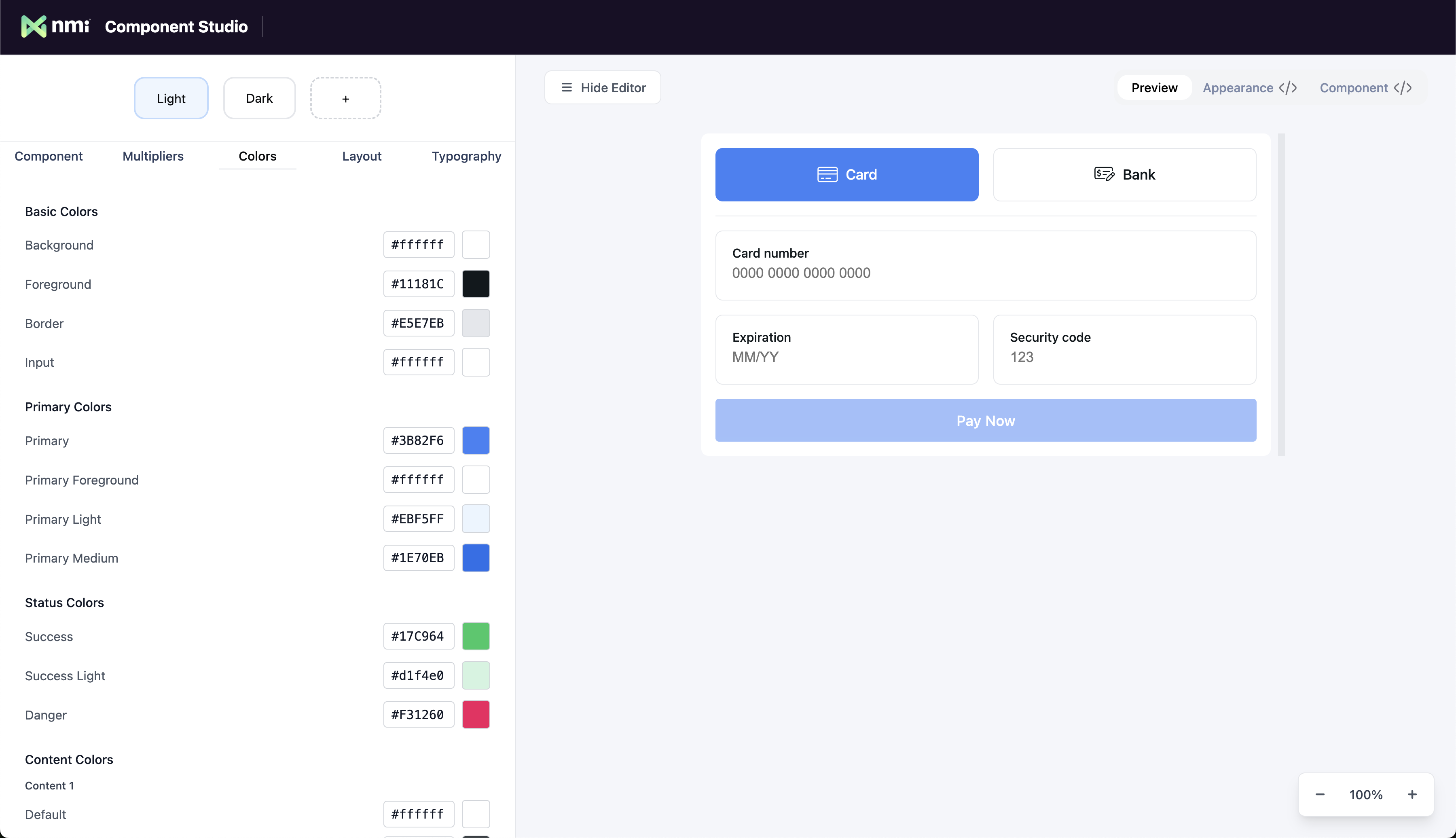
After you are done customizing the look and feel of your component, selecting the code tab will show you your Appearance object. This object is then passed to your payment component as a prop to apply your theme.
Resources: Customize Styling
Step 7: Implement Apple Pay and Google Pay (Optional Step)
Configure Apple Pay and Google Pay in order to quickly accept payments without requiring users to enter in their card details.
Add Apple Pay and Google Pay to the USER.CAMELCOMPONENTPREFIXPayments component's paymentMethods parameter.
<USER.CAMELCOMPONENTPREFIXPayments
      tokenizationKey="YOUR_PUBLIC_KEY_HERE"
      paymentMethods={["apple-pay", "google-pay"]}
      ...
When integrating Apple Pay/Google Pay, use this callback to process the payment. The below callback gets triggered when the Apple Pay or Google Pay button is pressed by the user.
onExpressCheckout?: (data: PaymentEvent) => void;Google Pay transactions will work automatically, but for Apple Pay, Apple requires merchants to upload the gateway’s Domain Verification File to your server to use Apple Pay. You can download the file and add your website to the “Allowed Domains” on your account from the Merchant Portal under Settings > Apple Pay. In short, you need to:
- Download the verification file.
- Upload the verification file to the
.well-knowndirectory on your web server. - Add your domain to the list of domains allowed to use Apple Pay.
Once these steps are complete, Apple Pay will be able to work with the Payment Component. The video below is an a example of how to configure Apple Pay for our other payment solutions, but the process will be the same.
Step 8: Payer Authentication (3DS) (Optional Step)
Payer Authentication is a fraud prevention service that facilitates the authentication of transactions before submitting them to the gateway for processing.
Payer Authentication enables the exchange of data between the merchant, card issuer, and the customer to validate the transaction is being performed by the rightful owner.
For the majority of transactions, the authentication occurs behind the scenes without interrupting the customer. Otherwise known as frictionless flows. In rare instances, the issuer may request a challenge. This step-up authentication flow would require the customer to validate themselves through additional information such as a one-time password.
Implementation Details: 3DS Integration Guide
Step 9: Go Live
Once testing is complete, replace your sandbox keys with production keys from your merchant account and deploy your integration.
Review the following before launching:
- Confirm all HTTPS is enforced across your payment flow.
- Replace the public tokenization key with your production key.
- Inject your production private API key via a secure environment variable.
- Consider enabling 3D Secure (3DS) for enhanced fraud protection on high-risk transactions.
- Keep your npm dependencies up to date to receive the latest security patches.
Best Practices for Secure Payments
- Never Store Card Data – Always rely on the Payment Component for secure handling.
- Use HTTPS Everywhere – Protect data in transit.
- Stay Up to Date – Regularly update your integration to leverage the latest security features.
Add the payment component to your application's checkout flow.
Configure the component to look and feel native to your experience.
Implement the server-side API endpoint to process payments with the NMI REST API.
Test the integration thoroughly using NMI's sandbox environment before going live.
Updated about 2 months ago