
Deposit History Component
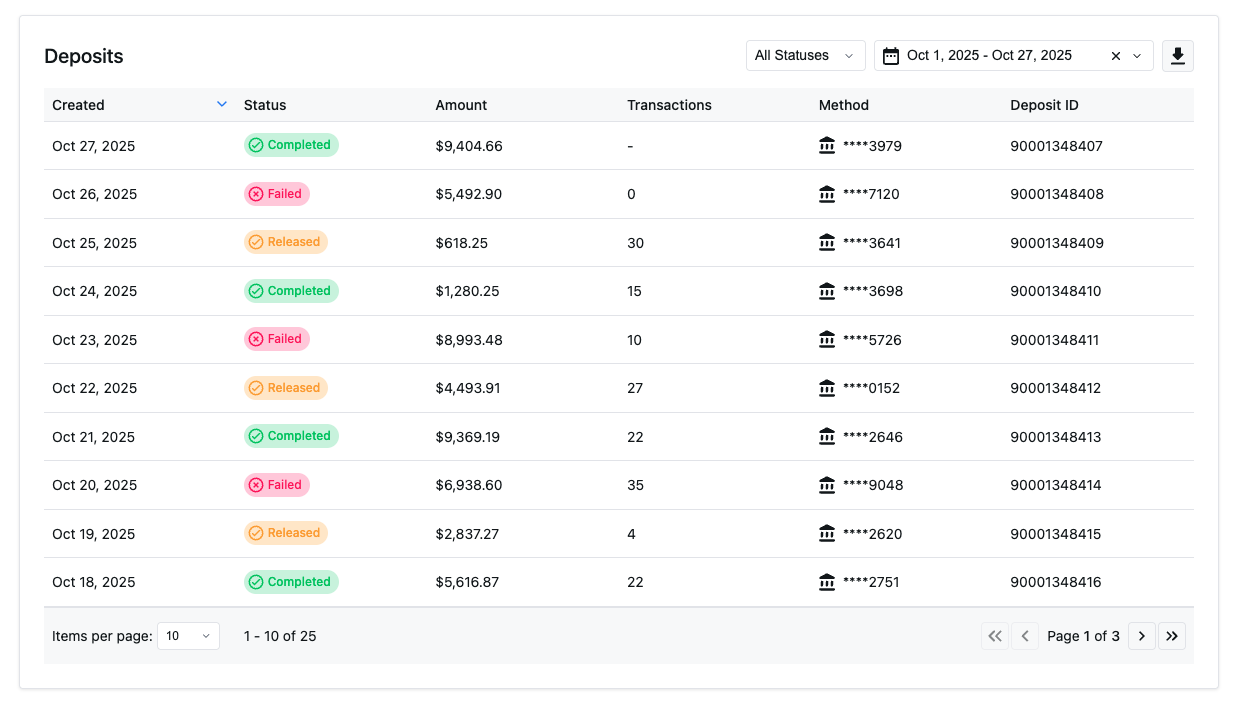
Displays a report of deposit information with filtering capabilities
The Deposit History Component embeds a complete view of merchant payouts directly into your application so merchants can track where their money is without leaving your platform.
Merchants can view deposits as they move through the payout lifecycle, drill into transaction-level details, apply filters, and export results—all within a familiar, branded experience that matches your application.
Requirements: This component requires an active NMI Payments account. Gateway-only accounts are currently not supported.
Key Features
Merchants using this component can:
View with dates, amounts, and payout status
View the transactions included in each deposit
Filter by date range, status, or deposit type and export with a single click
Installation
We offer a variety of npm modules for popular frameworks. The easiest way to get started is to install the module for the frame work being used.
npm i {user.reportingReactNpmPackage}npm i {user.reportingNpmPackage}Getting the API Token
To load deposit data, your backend must create a session token using an NMI Payments token.
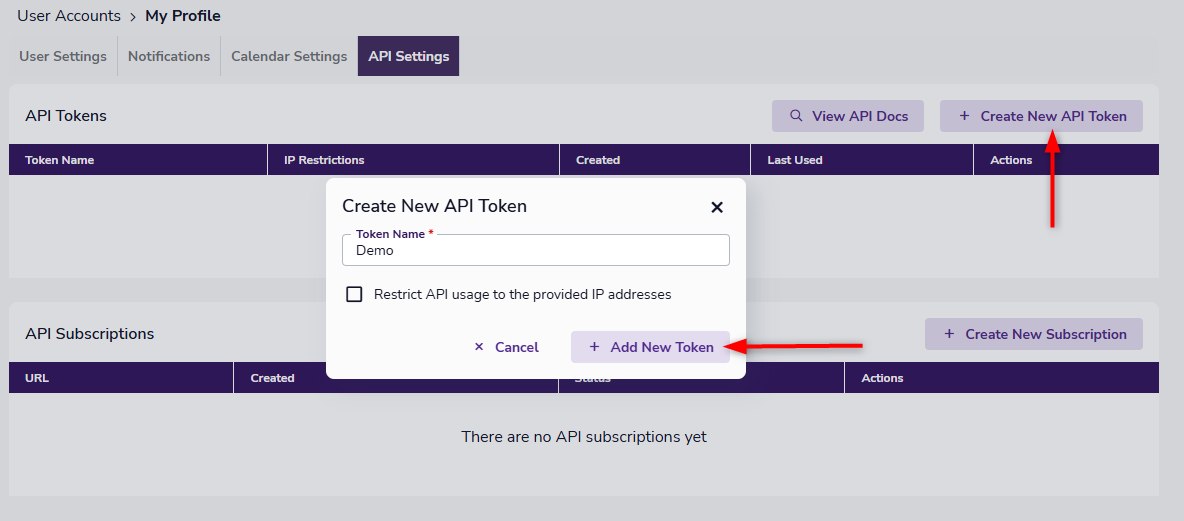
- Log in to your GATEWAYNAMEFULL portal
- Click your username in the top-right corner
- Select Settings
- Open the API Settings tab
- Click Create New API Token
Give the token a name, optionally restrict IPs, then click Add New Token.
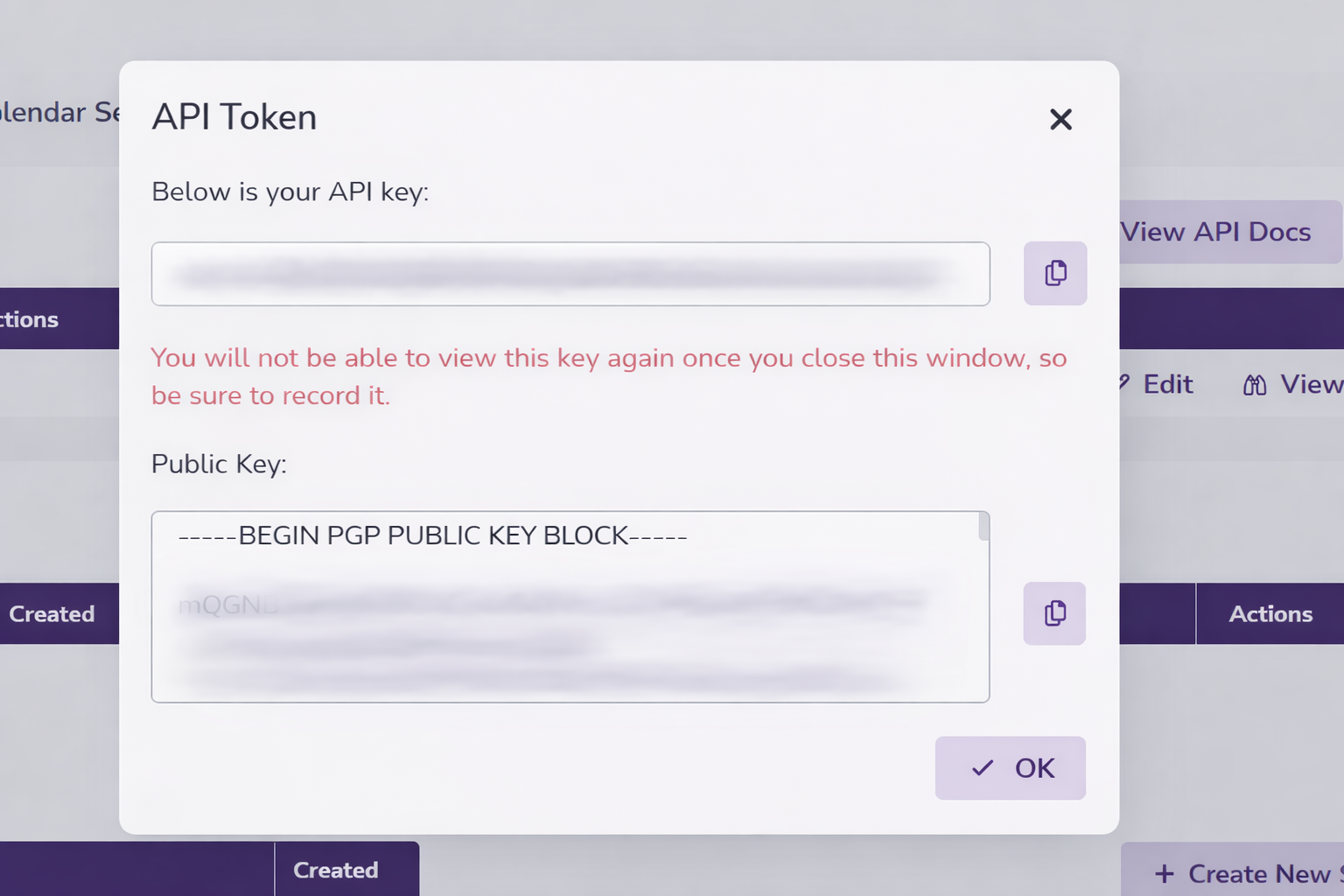
Your new token is now generated and displayed in a popup window (along with your public key which isn't needed for the deposit history component).
Once created, it cannot be copied after initially being created so be sure to save it during creation.
Using the API Token
See Embedded Component Authentication for more information on request and response details for using this token to create an embedded component session.
Key Functional Component Properties
Required Properties
fetchSessionId
fetchSessionIdA function that returns a short-lived session token used to authenticate the component.
fetchSessionId: () => Promise<SessionResponse>SessionResponse Type:
interface SessionResponse {
  sessionToken: string;
  expiresAt: number;
}
sequenceDiagram
participant DR as DepositReporting Component
participant YA as Your Application
participant API as Your API
participant RS as {user.brand} Reporting Service
Note over DR,RS: Session Token Flow
DR->>YA: fetchSessionId() called
Note right of DR: Component needs session token<br/>for API authentication
YA->>API: Call your session endpoint
Note right of YA: Your app calls your API<br/>with merchant context
API->>RS: POST /api/v1/sessions
Note right of API: Send API credentials<br/>and merchant context
RS-->>API: SessionResponse
Note left of RS: {<br/> sessionToken: "sess_xxx",<br/> expiresAt: timestamp<br/>}
API-->>YA: SessionResponse
Note left of API: Return session token<br/>to your application
YA-->>DR: SessionResponse
Note left of YA: Pass session token<br/>to component
DR->>RS: API calls with session token
Note right of DR: Use token for all<br/>reporting API requests
RS-->>DR: Deposit data
Note left of RS: Return deposit information<br/>based on session permissions
Optional Properties
appearance
appearanceControls theming and visual styling.
appearance?: AppearanceSee the Appearance API to learn more.
pagination
paginationControls initial pagination state.
pagination?: {
  pageSize?: number; // default: 10
  currentPage?: number; // default: 1
}
onDepositsLoaded
onDepositsLoadedFires when deposit data is successfully loaded..
onDepositsLoaded?: (deposits: DepositData[]) => voidDepositData Type:
interface DepositData {
  id: string;
  created: string; // ISO 8601 format
  status: DepositStatus;
  amount: number; // Decimal number with currency precision
  transactionCount: number;
  accountNumber: string; // Account number (last 4 digits)
}

type DepositStatus = 'pending' | 'completed' | 'released';
onError
onErrorFires when a data or processing error occurs.
onError?: (error: { type: string; message: string; code?: string }) => voidonRowClick
onRowClickFires when a deposit row is selected.
onRowClick?: (deposit: DepositData) => voidonFilterChange
onFilterChangeFires when filters are updated.
onFilterChange?: (filters: DepositFilters) => voidDepositFilters Type:
interface DepositFilters {
  status?: 'all' | DepositStatus;
  search?: string; // Search term for filtering across deposit fields
  startDate?: string; // ISO 8601 date string for filtering by created date (inclusive)
  endDate?: string; // ISO 8601 date string for filtering by created date (inclusive)
}
onSortChange
onSortChangeFires when sorting changes.
onSortChange?: (sort: SortConfig) => voidSortConfig Type:
interface SortConfig {
  field: 'created' | 'status' | 'amount' | 'transactionCount' | 'id';
  direction: 'asc' | 'desc';
}
onPaginationChange
onPaginationChangeFires when pagination state changes.
onPaginationChange?: (pagination: PaginationState) => voidPaginationState Type:
interface PaginationState {
  currentPage: number;
  pageSize: number;
  totalCount: number;
  lastPage: number;
}
onExport
onExportFires when an export file is ready.
onExport?: (data: ExportData) => voidExportData Type:
interface ExportData extends ExportConfig {
  downloadUrl: string;
  fileSize: string;
  expiresAt: string;
  fileHash: string;
}

interface ExportConfig {
  format: 'csv';
  filters: DepositFilters;
  sort: string;
}
children
childrenOptional React children rendered inside the component.
children?: ReactNodeExample Implementation
import { DepositReporting } from '{user.reportingReactNpmPackage}';

const MyComponent = () => {
  const fetchSessionId = async () => {
    const response = await fetch('/myapi/session');
    return response.json();
  };

  const handleDepositsLoaded = (deposits) => {
    console.log('Deposits loaded:', deposits);
  };

  const handleError = (error) => {
    console.error('Error:', error);
  };

  return (
    <DepositReporting
      fetchSessionId={fetchSessionId}
      pagination={{ pageSize: 25, currentPage: 1 }}
      onDepositsLoaded={handleDepositsLoaded}
      onError={handleError}
      onRowClick={(deposit) => console.log('Row clicked:', deposit)}
      onFilterChange={(filters) => console.log('Filters changed:', filters)}
      onSortChange={(sort) => console.log('Sort changed:', sort)}
      onPaginationChange={(pagination) => console.log('Pagination changed:', pagination)}
      onExport={(data) => console.log('Export ready:', data)}
    />
  );
};
// main.js
import '{user.reportingNpmPackage}/{user.componentPrefix}deposit-reporting-widget.js';
const fetchSessionId = async () => {
const response = await fetch('/api/session', {
method: 'POST',
headers: { 'Content-Type': 'application/json' },
body: JSON.stringify({ merchantId: 'your-merchant-id' })
});
return response.json();
};
document.addEventListener('DOMContentLoaded', () => {
const widget = document.createElement('{user.componentPrefix}deposit-reporting');
widget.fetchSessionId = fetchSessionId;
widget.pagination = { pageSize: 10, currentPage: 1 };
widget.addEventListener('depositsLoaded', (e) => console.log('Deposits loaded:', e.detail));
widget.addEventListener('error', (e) => console.error('Error:', e.detail));
widget.addEventListener('rowClick', (e) => console.log('Row clicked:', e.detail));
widget.addEventListener('filterChange', (e) => console.log('Filters changed:', e.detail));
widget.addEventListener('sortChange', (e) => console.log('Sort changed:', e.detail));
widget.addEventListener('paginationChange', (e) => console.log('Pagination changed:', e.detail));
widget.addEventListener('export', (e) => console.log('Export:', e.detail));
document.getElementById('deposit-reporting-container').appendChild(widget);
});Nesting Embedded Components
The Deposit History component supports nested components for enhanced functionality and user experience.
When paired with the Deposit Summary component, clicking a deposit row automatically renders detailed deposit information in place.
<DepositReporting>
  <DepositSummary />
</DepositReporting>
Example Nesting Implementation
The following example demonstrates the proper implementation of nested components using DepositReporting and DepositSummary:
<DepositReporting
  fetchSessionId={fetchSessionId}
  appearance={{ theme: 'light', radiusSize: 'larger' }}
>
  <DepositSummary
    fetchSessionId={fetchSessionId}
    appearance={{ theme: 'light', radiusSize: 'larger' }}
  />
</DepositReporting>
Updated 20 days ago