
Transaction History Component
Filterable transaction table to view, manage, and export transaction data
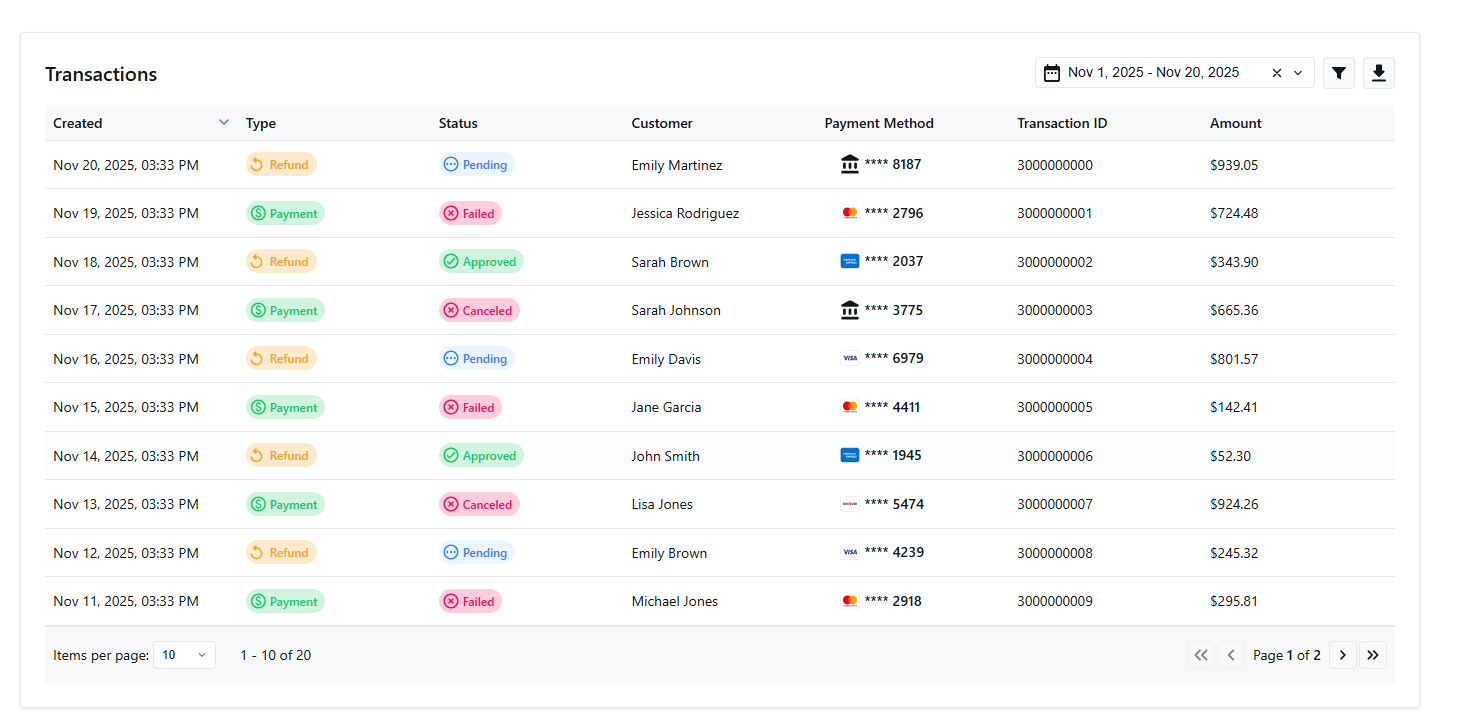
Embed a near real-time transaction table directly in your platform so merchants can review activity, filter and sort results, open transaction details, and export data without switching tools.
This is a reporting Embedded Component. Embedded Components are a suite: the reporting components—like this one, built on the
USER.REPORTINGNPMPACKAGEpackages and the/api/v1/sessionssession API—embed transaction and deposit views in your platform, while the Payment Component handles secure payment capture. To accept payments, use the Payment Component.
Installation
We offer a variety of npm modules for popular frameworks. The easiest way to get started is to install the module for the framework being used.
npm i USER.REPORTINGREACTNPMPACKAGEnpm i USER.REPORTINGNPMPACKAGEGet Your API Keys
Sandbox Keys for Testing
For testing, you can find your sandbox key on the My Sandbox Keys page.
- Located under Partner Key section
- Must be kept secure on your server
- Authorizes access to transaction data
Production Keys
When you are ready to go live, replace your sandbox key with a production key.
Production Keys are available in the Partner Portal. See Getting Your API Keys for details.
Security: Never expose your API security key in client-side code. Always keep it secure on your server. While we have included your test key in the code sample, you should not commit it to source control and instead inject it via an environment variable.
Merchant Central only partners should use the Merchant Central API Key.
If you are not a Gateway partner, you will create a session token using your Merchant Central API token instead of the Gateway key.
- Log in to your NMI Payments portal
- Click your username in the top-right corner
- Select Settings
- Open the API Settings tab
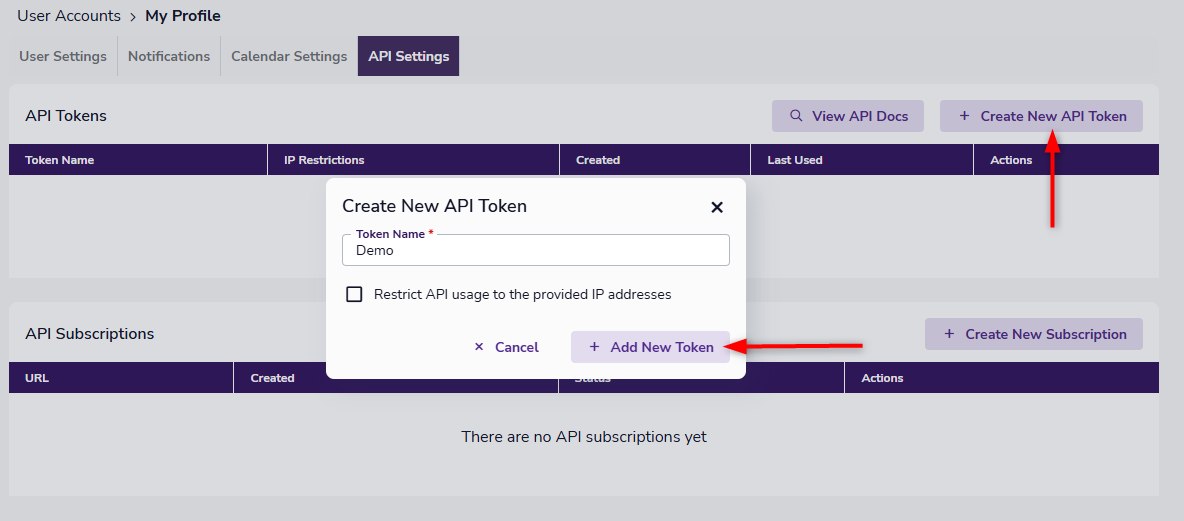
- Click Create New API Token
Give the token a name, optionally restrict IPs, then click Add New Token.
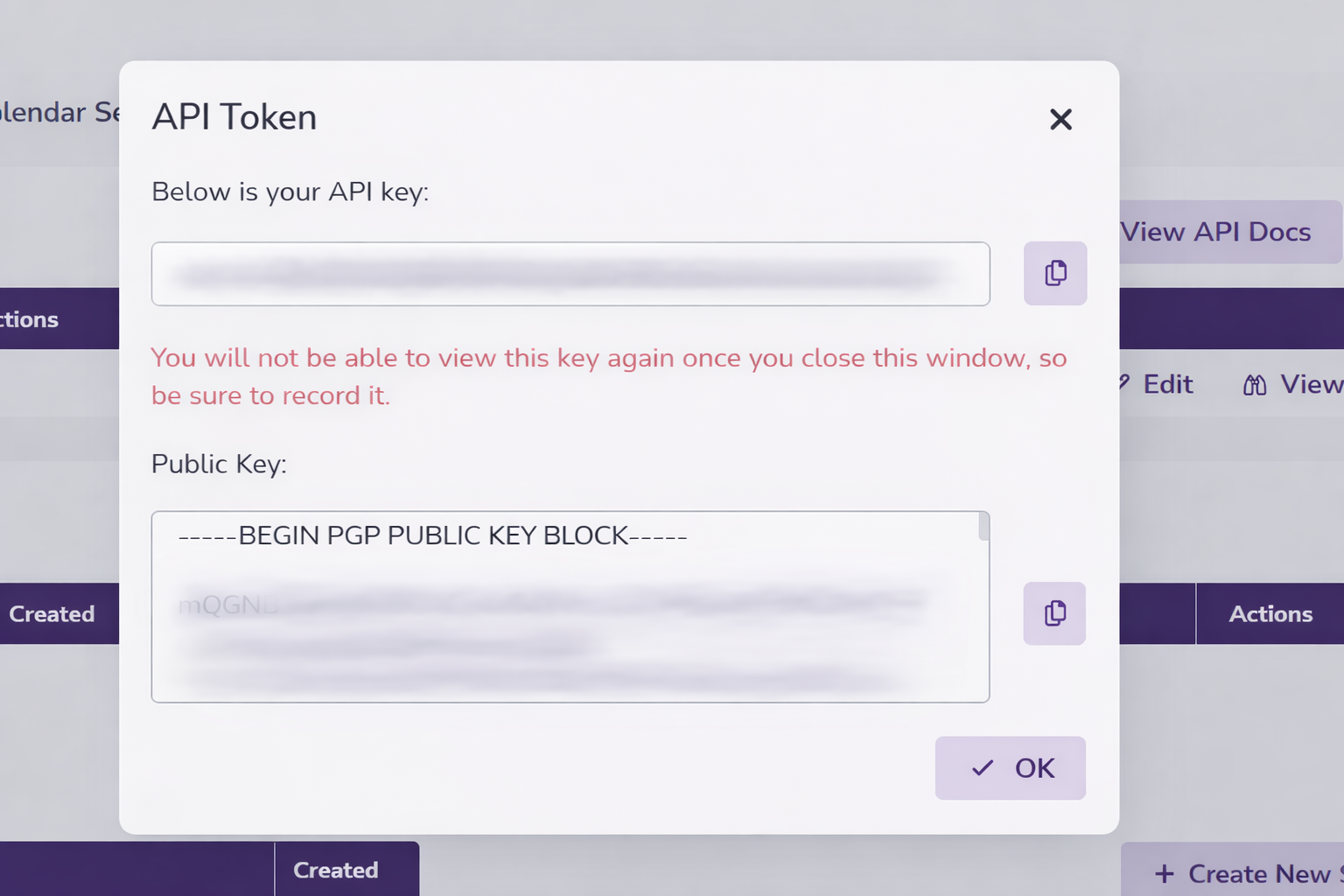
Your new token is now generated and displayed in a popup window (along with your public key which isn't needed for the deposit history component).
Once created, it cannot be copied after initially being created so be sure to save it during creation.
Key Functional Component Properties
Required Properties
fetchSessionId
fetchSessionIdThe fetchSessionId property is a required function that you pass that returns a session token.
fetchSessionId: () => Promise<SessionResponse>SessionResponse Type:
interface SessionResponse {
  sessionToken: string;
  expiresAt: number;
}
sequenceDiagram
participant TR as TransactionReporting Component
participant YA as Your Application
participant API as Your API
participant RS as {user.brand} Reporting Service
Note over TR,RS: Session Token Flow
TR->>YA: fetchSessionId() called
Note right of TR: Component needs session token<br/>for API authentication
YA->>API: Call your session endpoint
Note right of YA: Your app calls your API<br/>with merchant context
API->>RS: POST /api/v1/sessions
Note right of API: Send API credentials<br/>and merchant context
RS-->>API: SessionResponse
Note left of RS: {<br/> sessionToken: "sess_xxx",<br/> expiresAt: timestamp<br/>}
API-->>YA: SessionResponse
Note left of API: Return session token<br/>to your application
YA-->>TR: SessionResponse
Note left of YA: Pass session token<br/>to component
TR->>RS: API calls with session token
Note right of TR: Use token for all<br/>reporting API requests
RS-->>TR: Deposit data
Note left of RS: Return deposit information<br/>based on session permissions
reportingServiceUrl
reportingServiceUrlRequired. The URL of the reporting endpoint from which data will be retrieved.
reportingServiceUrl: StringOptional Properties
demoSet
demoSetOptional. When provided, the component will load demo data for preview purposes.
Accepted values: gateway, merchant-central.
To load production data, omit this property or pass an empty value.
demoSet?: String //gateway, merchant-centralappearance
appearanceOptional styling configuration. See the Appearance API to learn more.
appearance?: Appearancepagination
paginationThe pagination state.
pageSize: Number of items per page (default: 10)currentPage: Initial page number (default: 1)
pagination?: {
  pageSize?: number;
  currentPage?: number;
}
onTransactionsLoaded
onTransactionsLoadedFires with TransactionData when transaction data is loaded.
onTransactionsLoaded?: ((transactions: TransactionData[]) => void)TransactionData Type:
interface TransactionData {
  id: string;
  date: string; // ISO 8601 format
  type: TransactionType;
  status: TransactionStatus;
  amount: number; // Decimal number with currency precision
  payment_method: PaymentMethod; // e.g., 'ach' or 'card'
  processor_response_code: string;
  processor_response_code_description: string;
  gateway_response_code: string;
  gateway_response_description: string;
  payment_method_brand: PaymentCardBrand;
  payment_method_last_4: string; // Last 4 digits of card/account
  payment_method_expiration_date: string; // 'MM/YY' format
  customer_name: string;
  customer_email: string;
  customer_address: string;
  customer_country: string;
  order_id: string;
  entry_method: EntryMethod;
  merchant_defined_fields: Record<string, string>;
  authorization_code: string;
  events: TransactionEvent[];
}

type TransactionType = 'payment' | 'refund';
type TransactionStatus = 'pending' | 'failed' | 'complete' | 'canceled';
type PaymentMethod = 'card' | 'ach';
type PaymentCardBrand = 'visa' | 'mastercard' | 'american_express' | 'discover';
type TransactionEvent = {
  name: string;
  description?: string; // optional
  date: string; // ISO 8601 format
}
onError
onErrorFires when an error occurs during data loading or processing.
onError?: (error: { type: string; message: string; code?: string }) => voidonRowClick
onRowClickFires when a deposit row is clicked.
onRowClick?: (transaction: TransactionData) => voidonFilterChange
onFilterChangeFires when filter settings change.
onFilterChange?: (filters: TransactionFilters) => voidTransactionFilters Type:
type TransactionFilters = {
  statuses?: TransactionStatus[]; // Transaction status filter - exact match
  types?: TransactionType[]; // Transaction type filter - exact match
  payment_method?: PaymentMethod[]; // Payment method filter - exact match
  amount_min?: number; // Minimum amount filter - exact match
  amount_max?: number; // Maximum amount filter - exact match
  transaction_id?: string; // Transaction ID filter - exact match
  customer_first_name?: string; // Customer first name filter - exact match
  customer_last_name?: string; // Customer last name filter - exact match
  customer_email?: string; // Customer email filter - exact match
  start_date?: string; // ISO 8601 date string for filtering by created date (inclusive)
  end_date?: string; // ISO 8601 date string for filtering by created date (inclusive)
}
onSortChange
onSortChangeFires when sort settings change.
onSortChange?: (sort: TransactionSortConfig) => voidTransactionSortConfig Type:
interface TransactionSortConfig {
  field: 'date' | 'types' | 'statuses' | 'customer_name' | 'amount' | 'id';
  direction: 'asc' | 'desc';
}
onPaginationChange
onPaginationChangeFires when pagination settings change.
onPaginationChange?: (pagination: TransactionPaginationState) => voidPaginationState Type:
interface TransactionPaginationState {
  currentPage: number;
  pageSize: number;
  totalCount: number;
  lastPage: number;
}
onExport
onExportFires when export data is ready.
onExport?: (data: TransactionReportingExportData) => voidExportData Type:
interface TransactionReportingExportData extends TransactionReportingExportConfig {
  downloadUrl: string;
  fileSize: string;
  expiresAt: string;
  fileHash: string;
}

interface TransactionReportingExportConfig {
  format: 'csv';
  filters: TransactionFilters;
  sort: string;
}
children
childrenOptional React children rendered inside the component.
children?: ReactNodeExample Implementation
import { TransactionReporting } from 'USER.REPORTINGREACTNPMPACKAGE';

const MyComponent = () => {
  const fetchSessionId = async () => {
    //check session page for details
  };

  const handleTransactionsLoaded = (transactions) => {
    console.log('Transactions loaded:', transactions);
  };

  const handleError = (error) => {
    console.error('Error:', error);
  };

  return (
    <TransactionReporting
      fetchSessionId={fetchSessionId}
      reportingServiceUrl="REPLACE_WITH_REPORTING_SERVICE_URL"
      pagination={{ pageSize: 25, currentPage: 1 }}
      onTransactionsLoaded={handleTransactionsLoaded}
      onError={handleError}
      onRowClick={(deposit) => console.log('Row clicked:', deposit)}
      onFilterChange={(filters) => console.log('Filters changed:', filters)}
      onSortChange={(sort) => console.log('Sort changed:', sort)}
      onPaginationChange={(pagination) => console.log('Pagination changed:', pagination)}
      onExport={(data) => console.log('Export ready:', data)}
    />
  );
};
// main.js
import 'USER.REPORTINGNPMPACKAGE';
const fetchSessionId = async () => {
//check session page for details
};
const widget = document.createElement('USER.COMPONENTPREFIXtransaction-reporting');
widget.fetchSessionId = fetchSessionId;
widget.reportingServiceUrl = REPORTING_SERVICE_URL;
widget.pagination = { pageSize: 10, currentPage: 1 };
widget.onTransactionsLoaded = (transactions) => console.log('Transactions loaded:', transactions);
widget.onError = (error) => console.error('Error:', error);
widget.onRowClick = (transaction) => console.log('Row clicked:', transaction);
widget.onFilterChange = (filters) => console.log('Filters changed:', filters);
widget.onSortChange = (sort) => console.log('Sort changed:', sort);
widget.onPaginationChange = (pagination) => console.log('Pagination changed:', pagination);
widget.onExport = (data) => console.log('Export:', data);
document.getElementById('transaction-reporting-container').appendChild(widget);Updated 20 days ago