
Deposit Summary Component
Detailed deposit information including transaction breakdown and transactions
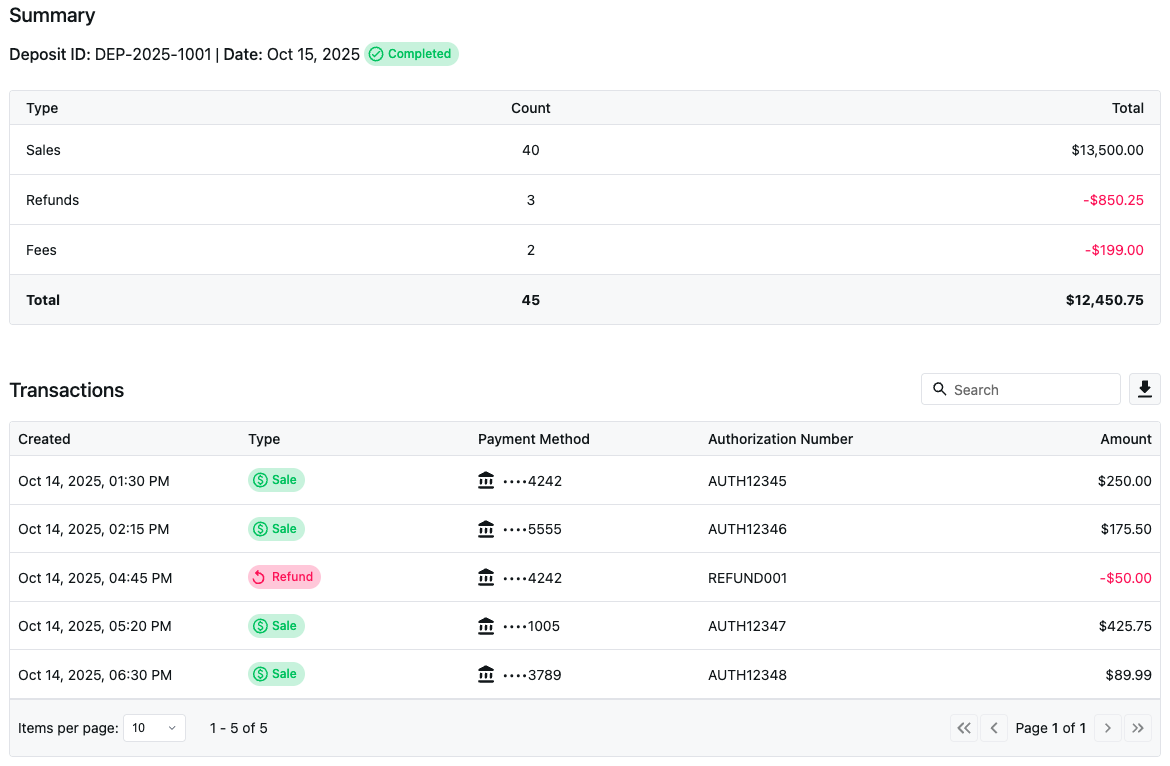
Show a complete view of a single deposit inside your platform, including deposit metadata, a transaction-type breakdown, and a paginated transaction list with export support.
Requirements: This component requires an active NMI Payments account. Gateway-only accounts are currently not supported.
Standalone: Render a specific deposit by passing a depositId.
Event-driven (nested): Place it inside the DepositReporting component to create a master-detail workflow where clicking a deposit loads its summary automatically.
- Deposit Metadata: reference number, created date, and status
- Transaction Type Breakdown: counts and totals
- Paginated List: transaction-level details
- Export: CSV
Installation
We offer a variety of npm modules for popular frameworks. The easiest way to get started is to install the module for the frame work being used.
npm i {user.reportingReactNpmPackage}npm i {user.reportingNpmPackage}Getting the API Token
To load deposit data, your backend must create a session token using an NMI Payments token.
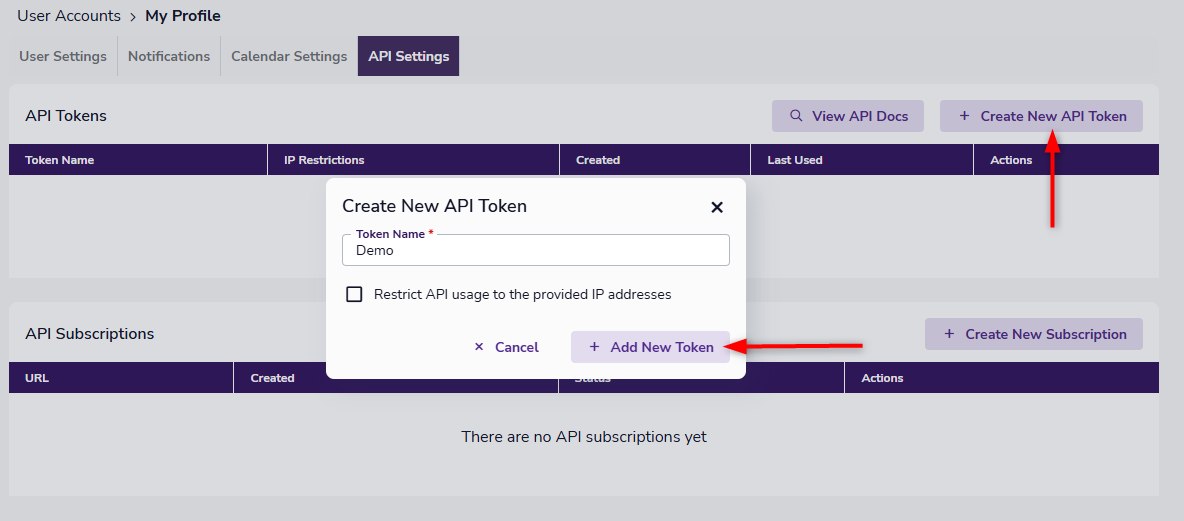
- Log in to your GATEWAYNAMEFULL portal
- Click your username in the top-right corner
- Select Settings
- Open the API Settings tab
- Click Create New API Token
Give the token a name, optionally restrict IPs, then click Add New Token.
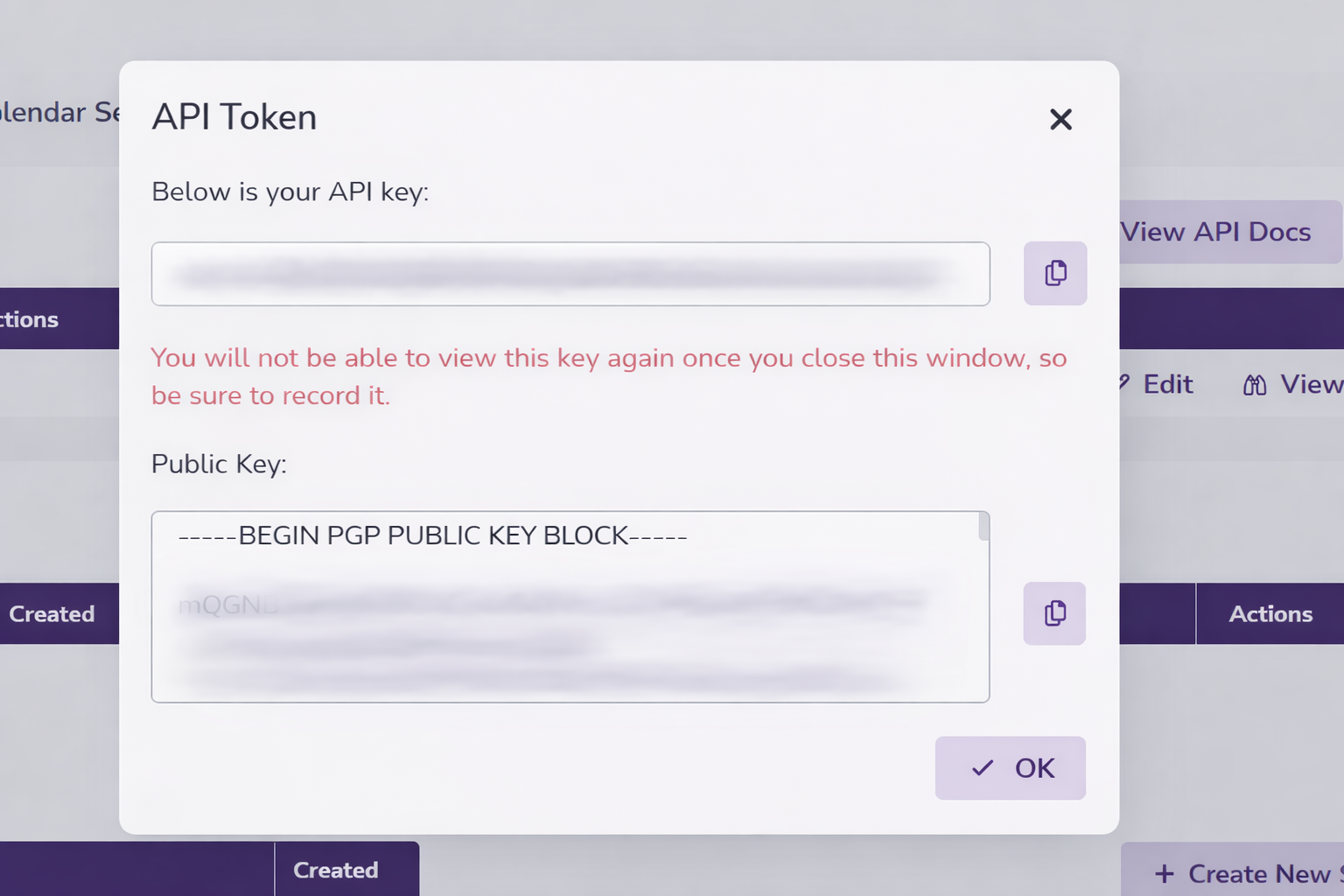
Your new token is now generated and displayed in a popup window (along with your public key which isn't needed for the deposit history component).
Once created, it cannot be copied after initially being created so be sure to save it during creation.
Using the API Token
See Embedded Component Authentication for more information on request and response details for using this token to create an embedded component session.
Key Functional Component Properties
Required Properties
fetchSessionId
fetchSessionIdA function that returns a session token for the component to use.
Your API backend uses a secure API credential to obtain a session token for your component. This session token is a short-lived, secure credential that authenticates an embedded component.
fetchSessionId: () => Promise<SessionResponse>SessionResponse Type:
interface SessionResponse {
  sessionToken: string;
  expiresAt: number;
}
sequenceDiagram
participant DR as DepositReporting Component
participant YA as Your Application
participant API as Your API
participant {user.brand} as {user.brand} Session Service
participant RS as {user.brand} Reporting Service
Note over DR,RS: Session Token Flow
DR->>YA: fetchSessionId() called
Note right of DR: Component needs session token<br/>for API authentication
YA->>API: Call your session endpoint
Note right of YA: Your app calls your API<br/>with merchant context
API->>{user.brand}: POST /api/v1/sessions
Note right of API: Send API credentials<br/>and merchant context
{user.brand}-->>API: SessionResponse
Note left of {user.brand}: {<br/> sessionToken: "sess_xxx",<br/> expiresAt: timestamp<br/>}
API-->>YA: SessionResponse
Note left of API: Return session token<br/>to your application
YA-->>DR: SessionResponse
Note left of YA: Pass session token<br/>to component
DR->>RS: API calls with session token
Note right of DR: Use token for all<br/>reporting API requests
RS-->>DR: Deposit data
Note left of RS: Return deposit information<br/>based on session permissions
Optional Properties
appearance
appearanceStyling configuration for the component. See the Appearance API to learn more.
appearance?: AppearancedepositId
depositIdLoads the component in standalone mode. When provided, the component will automatically load the deposit summary and transactions for the specified deposit ID. If not provided, the component will wait for a depositSelected event from a parent DepositReporting component.
depositId?: stringonSummaryLoaded
onSummaryLoadedFires with DepositSummary when deposit summary data is loaded.
onSummaryLoaded?: (data: DepositSummary) => voidDepositSummary Type:
interface DepositSummary {
  referenceNumber: number;
  createdDate: string; // ISO 8601 format
  status: DepositStatus;
  summary: DepositBreakdown[];
  totalAmount: number;
  currency: string;
  transactionsCount: number | null;
}

interface DepositBreakdown {
  type: string;
  count: number | null;
  subtotal: number;
  total: number;
}

type DepositStatus = 'completed' | 'failed' | 'released';
onTransactionsLoaded
onTransactionsLoadedFires with DepositTransactionPage when transaction data is loaded.
onTransactionsLoaded?: (data: DepositTransactionPage) => voidDepositTransactionPage Type:
interface DepositTransactionPage {
  data: DepositTransaction[];
  pagination: {
    page: number;
    pageSize: number;
    totalPages: number;
    totalRecords: number;
  };
}

interface DepositTransaction {
  createdDate: string; // ISO 8601 date string
  type: string; // 'payment', 'refund', etc.
  paymentMethod: string; // Masked, e.g., "4242"
  authorizationNumber: string;
  amount: number;
}
onTransactionExport
onTransactionExportFires when transaction export data is ready.
onTransactionExport?: (data: TransactionExportData) => voidTransactionExportData Type:
interface TransactionExportData extends TransactionExportConfig {
  downloadUrl: string;
  fileSize: string;
  expiresAt: string;
  fileHash: string;
}

interface TransactionExportConfig {
  format: 'csv';
  filters: {
    search?: string;
    startDate?: string;
    endDate?: string;
  };
}
onError
onErrorFires when an error occurs during data loading or processing.
TypeScript:
onError?: (error: { type: string; message: string; code?: string }) => voidUsage
Standalone Mode
Provide depositId to load a specific deposit directly.
<DepositSummary
  depositId="157842685"
  fetchSessionId={fetchSessionId}
  onSummaryLoaded={(summary) => console.log('Summary:', summary)}
  onTransactionsLoaded={(transactions) => console.log('Transactions:', transactions)}
/>
Event-Driven Mode (Nested)
When nested inside a DepositReporting component, the depositId prop is not required. The component responds to deposit selection automatically.
<DepositReporting fetchSessionId={fetchSessionId}>
  <DepositSummary
    fetchSessionId={fetchSessionId}
    onSummaryLoaded={(summary) => console.log('Summary:', summary)}
    onTransactionsLoaded={(transactions) => console.log('Transactions:', transactions)}
  />
</DepositReporting>
Nesting Embedded Components
Some embedded components support nesting to create a master-detail experience.
DepositReportingrenders a deposit list- When a user clicks a row, it conditionally renders
DepositSummaryto show details for the selected deposit
<DepositReporting>
  <DepositSummary />
</DepositReporting>
Example Nesting Implementation
The following example demonstrates the proper implementation of nested components using DepositReporting and DepositSummary:
JSX:
<DepositReporting
  fetchSessionId={fetchSessionId}
  appearance={{ theme: 'light', radiusSize: 'larger' }}
  pagination={{ pageSize: 25, currentPage: 1 }}
  onDepositsLoaded={(deposits) => console.log('Deposits loaded:', deposits)}
  onRowClick={(deposit) => console.log('Row clicked:', deposit)}
>
  <DepositSummary
    fetchSessionId={fetchSessionId}
    appearance={{ theme: 'light', radiusSize: 'larger' }}
    onSummaryLoaded={(summary) => console.log('Summary loaded:', summary)}
    onTransactionsLoaded={(transactions) => console.log('Transactions loaded:', transactions)}
    onTransactionExport={(exportData) => console.log('Export ready:', exportData)}
    onError={(error) => console.error('Error:', error)}
  />
</DepositReporting>
Updated 19 days ago